


Free National Mobile Map Package (MMPK) Program
The Enterprise Geospatial Services Team believes you should have access to the data your taxes pay to create in a modern format, usable offline, for free. The BLM National Recreation MMPK program is an evolution of the BLM New Mexico Hunting/Recreation Map system, which provided offline data for New Mexico in an award-winning program for nine years.
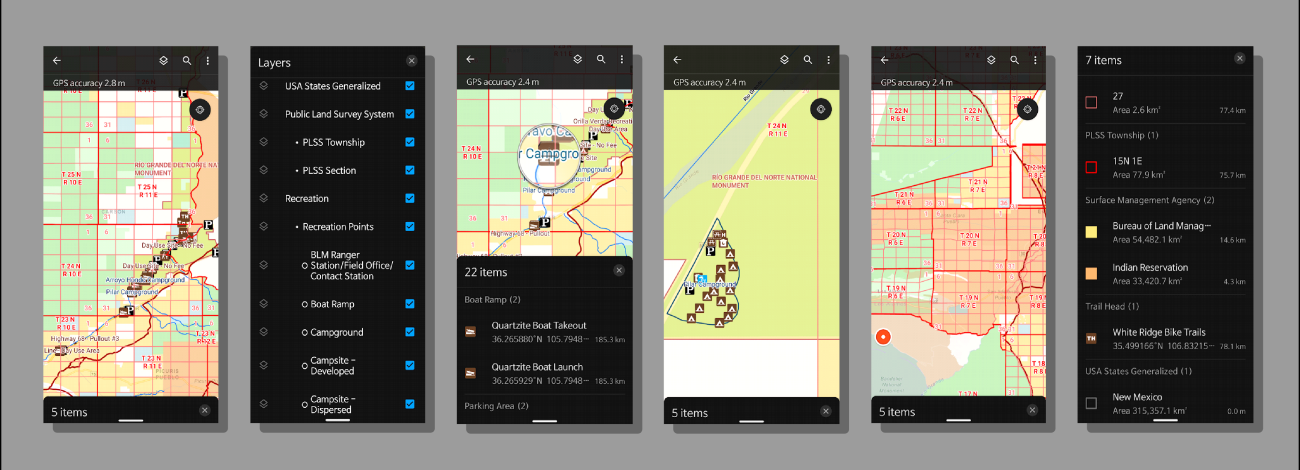
Anyone can download statewide MMPK files from Field Maps WITHOUT an account. These files work with no data connection and show your location on top of various BLM data with a recreation focus. Currently the western 18 BLM states are being individually produced, with plans to increase to all 50 states (and possibly territories) soon. These map files will be updated quarterly in a semi-automated process.
If you'd like to try BLM's Recreation Mobile Map Packages, follow these steps.
- Download the ArcGIS Field Maps app from the Google Play Store for Android or Apple App Store for iOS
- Open the app and grant the location permissions it requests. If you do not approve location permissions, your GPS functions will not work
- Tap 'SKIP sign in' at the bottom (you do not need an account to use these)
- Tap the search bar/button at the top/top right
- Search for BLM MMPK [State Name] (link to demo)
- Scroll to find the state or states you want to download
- Tap on the download icon on the right. A blue circle will show the download process
- Once downloaded, tap on it to open,
- Explore the data within!
Downloaded files will ‘soft expire’ in 120 days from production with a warning notice when opening the file to download the latest version. Downloaded maps will still work in the meantime, but the warning will present every time you open the map. Please download updates as soon as possible.
Included Datasets
- Identify the lands around you
- BLM Administrative Unit Boundaries & Points
- State Offices
- District Offices
- Field Offices
- Other (Field Stations, Etc.)
- BLM National Grazing Allotment Boundaries
- Geographic Information Names System (GNIS) Place Names
- Mountains
- Ridges
- Various other named features
- Public Land Survey System (PLSS)
- Township/Range
- Sections
- Surface Management Agency
- Federal Bureau
- Bureau of Land Management
- National Park Service
- Department of Energy
- Bureau of Reclamation
- Department of Defense
- US Fish and Wildlife Service
- Reservations
- US Forest Service
- Other Federal
- Private (no owner data)
- Local Government
- State
- Federal Bureau
- BLM Administrative Unit Boundaries & Points
- Recreation related datasets
- BLM National Trails (GTLF)
- Public Motorized Trails
- Limited Public Motorized Trails
- Public Non-Motorized Trails
- Public Non-Mechanized Trails
- Trails managed for Public
- Trails not Assessed
- NPS (National Park Service) Public Trails
- BLM Recreation Sites
- Campgrounds
- Parking Areas
- Ranger Stations
- Picnic Areas
- Restrooms
- Trailheads
- Recreation Management Areas
- Much more
- National Conservation Lands
- National Conservation Areas (NCA)
- National Monuments
- Wilderness boundaries
- Wilderness Study Area (WSA) boundaries
- Wild and Scenic Rivers
- New Mexico Only – (Turn off if not desired)
- NM Department of Game and Fish (NM Dept of Wildlife) Data
- Game Management Units (Blue)
- Game Management Subunits
- NM Fishing Waters
- Watercraft Inspection Stations
- Boat Ramps
- Summer Catfish Waters
- Trophy Bass Waters
- Fishing Access
- Special Trout Waters – Streams
- Special Trout Waters – Lakes
- NMDOW Habitat Improvements – Lakes
- State Game Commission Lands
- NMDW Conservation Officer Districts
- (Off by default, turn on for contact information for local Officer)
- NM Department of Game and Fish (NM Dept of Wildlife) Data
- BLM National Trails (GTLF)
- Base Layers
- BLM National Contours – 20FT (Turn off under layers button if not needed)
- Esri’s Navigation Basemap
- Roads
- Building Footprints
- Parks and Forests
- Streams, Rivers, Ponds, and Lakes
Change Log
- May 2026
For New Mexico, we’ve renewed our partnership with the NM Department of Game and Fish (Soon to be NM Department of Wildlife) and are including updated datasets that were very popular in the CarryMap Hunting and Recreation Maps system. We are hoping to expand to more states soon, more information to come in the future.
If you have local contacts with your state Game and Fish equivalent in one of our mapping areas, please send them so we can reach out and offer to host their data in our maps.
More changes coming in the next update!
- January 2026
Fixed a problem with BLM SMA symbology scripting that prevented State and Local Government colors to display because of concatenation – Thank you for the report by a user in New Mexico
- September 2025
- Removed National Scenic & Historic Trails due to ownership and data issues. May return later
- Removed LCDO Trails from the New Mexico MMPK (GTLF Trails encompass these trails)
- Removed State Clipping Boundaries from export to remove duplication and confusion
- Added BLM Administrative Unit Boundaries and Point locations
- Added public BLM Trails data from the Ground Transportation Linear Features dataset (GTLF)
- Added 20FT Contour Vector Tile Package for entire USA
- Displays at three different view ranges
- 100 FT contour lines labeled
- Can turn off in Layers menu
- Updated ESRI Navigation Base Layer to July 2025
- Edited style to remove features that conflict with official BLM boundaries and SMA data
- Vegetation
- Wilderness/Study Areas
- Forests and other park features
- Ocean and other water features
- Various other features that conflicted with BLM data
- Now ‘transparent’ to allow for future display of imagery or other basemaps behind data
- Edited style to remove features that conflict with official BLM boundaries and SMA data
- Adjusted BLM SMA layer transparency from 40% to 50% to better show basemap data underneath
- Re symbolized all layers affected by MMPK legend duplication bug using Arcade driven symbology scripts
- SMA, Recreation Point Features, Place Names, etc.
- Disabled various attribute fields not needed in the field
- Removed some incorrect Recreation Management Area features
- Refined labeling on various layers and toned down PLSS grid lines
- Adjusted all layers to display more logical attributes when identified (tapped on)
- March 2025
- Surface Management Agency (SMA)
- Made Private SMA hollow so features underneath stand out.
- Trails data
- Added trails for Las Cruces District Office (New Mexico).
- Recreation Points
- Users reported issues with the Recreation Points layers having the wrong symbols. After looking into it, the original layer was symbolized by the wrong attribute which resulted in items missing, items being grouped that shouldn't have, and other issues. The layer symbology was rebuilt into one layer using Feature Subtype instead of Feature Type and re symbolized. Features with a count of zero were removed and will be reviewed after updates and re added if the count goes above zero. Thanks for the reports!
- Recreation Polygons
- Re-symbolized polygons to match the new BLM Recreation Cartography Standard for these features.
- PLSS
- Thinned township and range lines to not overwhelm the screen.
- State Boundaries
- Changed the state boundary dataset used as someone in Wyoming noticed the eastern boundary was inaccurate. Previous dataset also had a lot of issues cutting off data on the coasts. New layer is much more accurate and better represents coastlines and islands.
- Geographic Names Information System (GNIS)
- Added a subset of the GNIS Feature Points dataset for Points of Interest/Named points.
- Updated expiration to 120 days.
- Surface Management Agency (SMA)
Frequently Asked Questions
- 1. How do I change from Metric to standard measurement units?
- Open Field Maps. If in a map, back out to the main screen.
- Tap on the user icon at the top right
- Tap on UNITS
- Tap on Measurement Units
- Select the unit of your choice for each selection under that if desired
- 2. How can I use this with Imagery or Topo maps?
MMPK files contain all data for offline use. Raster data (imagery and topo maps) are very large files and having those in the MMPK files would make them extremely large to download. We have limited file space to host these.
We are looking at other solutions to provide features like this and working with ESRI to enable work arounds for their use.
- 3. Can I get THIS dataset added?
We understand, and we probably do as well. Since this is a national program, we are starting with national datasets, as we would like the same data to be available to all users. There are not standardized datasets for some of the data requested, so smaller local datasets may be added in the future to each state as available. Other datasets like Hunting Units are not BLM products, but we are looking at how we can provide them for use. This will require coordination between individual state Game and Fish departments and BLM.
Requested datasets:
- Trails
- Gates/Fences
- Hunting Units
- 4. Why are the maps in the north skewed east to west?
Due to some of the geographic projections of datasets included, higher latitudes may not display correctly, resulting in this skewed or stretched look. While you are still placed correctly, we’ve started working on solutions to this problem, which involve the largest datasets we are using, the Navigation and Contours Vector Tile Packages. These will have to be rebuilt and replaced, and we are hoping will be available in our next update later this year.
How to find BLM MMPKs on App
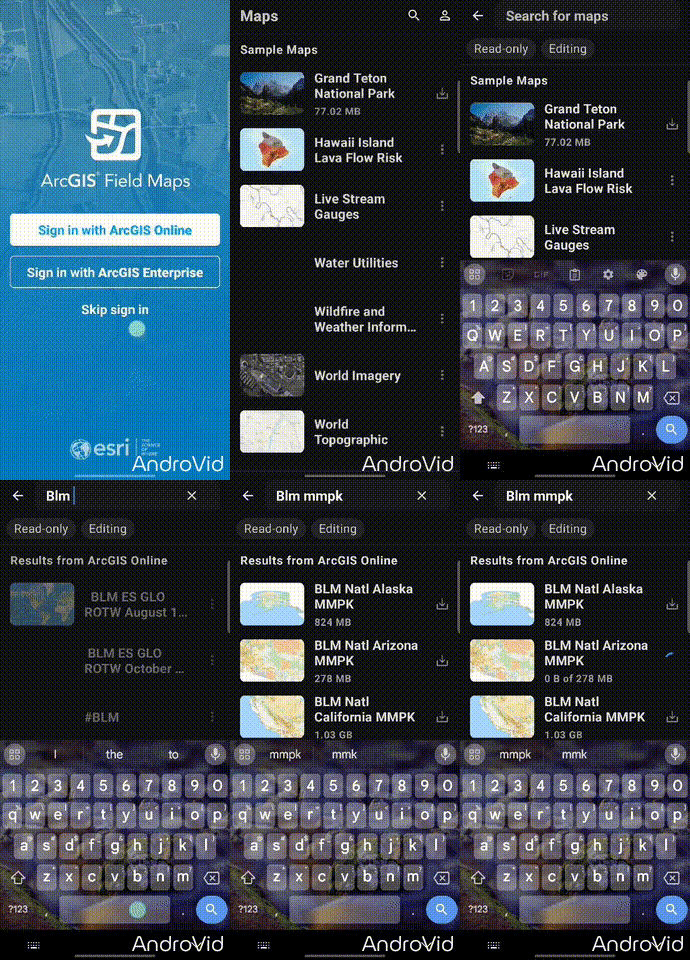
A demonstration of opening Field Maps App and searching for BLM MMPKs.
Other download methods
You can also download these via our new Geospatial Business Platform Mobile Hub page for use in ArcGIS Pro (ESRI license required) for desktop PC use.
Contact Us
If you have any questions on this product please e-mail blm_mobile_apps@blm.gov.